Virtual Location
Initially, to create a virtual location, it is necessary to create a user with the “role” of customer
It is necessary to determine which branches the user will have access toAfter creating the user, we must go to the companies > branches > virtual location tabTo create the virtual location, it is necessary to create the name, chosen policies that the user can view, assets and the userIf you want to add more members, pay attention to users with the “Customer” role and add them to the field.
After selecting the user and saving it, they will receive an email inviting them to access the tool, with only the information configured in the virtual location visible.
We can see that the user is selected to an appropriate group rule in the User > User Details tab
The visualization of the user with “customer role” after we determine certain policies and assets
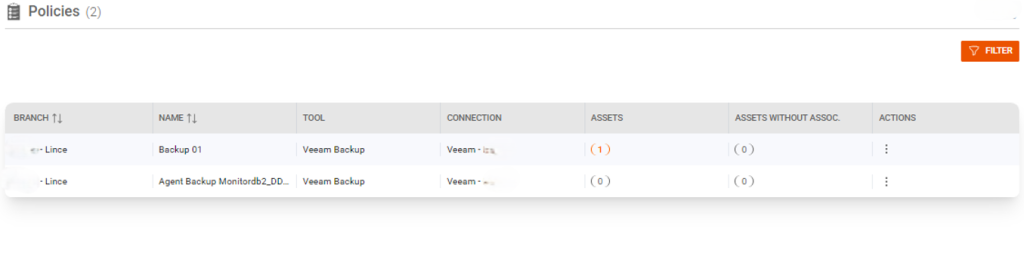
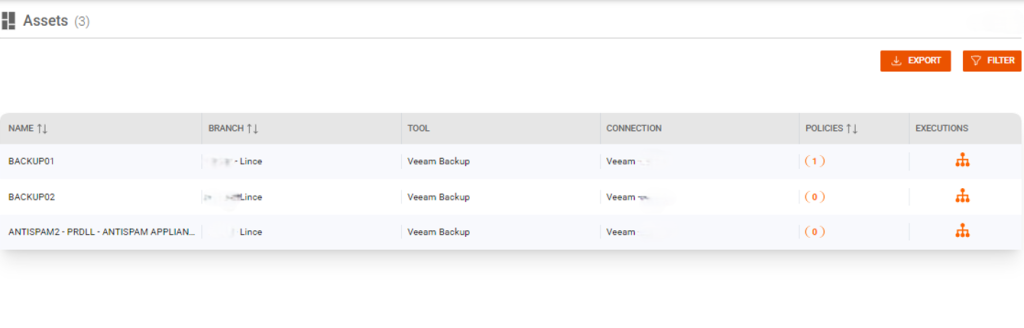
The virtual location function optimizes task distribution, allowing jobs to be assigned based on user proximity and availability, increasing team efficiency and productivity.
Related Articles
User Creation
To create users, you must log in to the tool using administration After logging in as administrations, you need to go to the "user management" tab, then "user" When creating a new user, you must enter the correct email address and the user’s role. ...Data Collected
FenixDFA Data Collected There are three types of data structures that are collected from backup software. 1. Job Session This is basically the session opened in some operation performed by the backup tool, and there may be more than 1 session for the ...Custom Views
Custom views are used to create groups to facilitate searching and filtering policies or assets Firstly, we must go to the Custom Views tab, just below connections Then we will go to add new item and choose a name for the group and a branch After ...AWS Backup
Overview This document describes the integration process between FenixDFA and AWS Backup, detailing the required configuration steps and data needed for successful integration. Prerequisites Access to the AWS Management Console AWS IAM user or role ...Azure Backup
Overview This document describes the integration process between FenixDFA and Azure Backup, detailing the required configuration steps and data needed for successful integration. Prerequisites Azure portal access with administrative privileges Active ...