SQL Native Integration Guide
Integration Guide
Overview
This document describes the integration process with SQL Native Backup (Standard, Enterprise and SQLEXPRESS), detailing the required configuration steps and data needed for successful integration.
Prerequisites
- SQL Server (Standard, Enterprise or SQLEXPRESS) version 2016 or later
- SQL Server Management Studio (SSMS) or equivalent tool
- Administrative access to SQL ServerMSSQL user must have default language us_english
Configuration Process
1. SQL Server Login Credentials
Create a new login for the FenixDFA agent with db_datareader permission
- USE master;
- CREATE LOGIN fenixdfa_agent WITH PASSWORD = ‘password’;
- CREATE USER fenixdfa_agent FOR LOGIN fenixdfa_agent;
- GRANT EXECUTE ON sys.xp_readerrorlog TO fenixdfa_agent
- USE msdb;
- CREATE USER fenixdfa_agent FOR LOGIN fenixdfa_agent;
- EXEC sp_addrolemember ‘db_datareader’, ‘fenixdfa_agent’;
Grant execute permission on sys.xp_readerrorlog to the login:
Plain Text
GRANT EXECUTE ON sys.xp_readerrorlog TO [fenixdfa_agent_login]SET LANGUAGE us_english to user configured for connection (fenixdfa_agent). You can do it through the MSSQL management panel.2. Configure the Importer
To configure the FenixDFA Importer, use the connections tab of the fenix console to create a new connection, select SQL and enter the information:
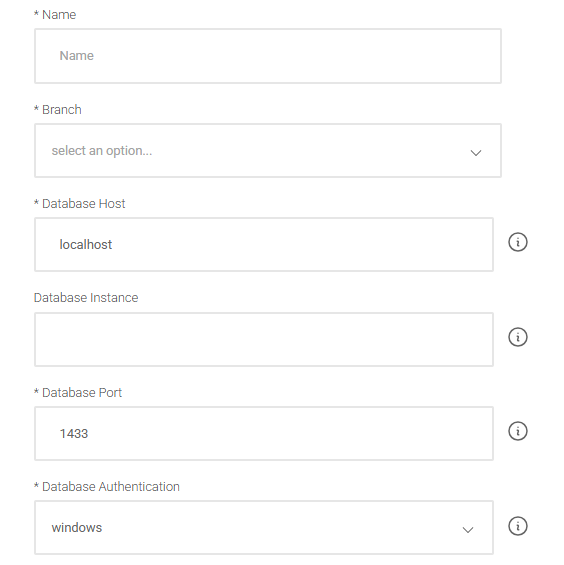
Note: Enter the SQL Database Instance Name. For default instance, leave it blank. For Express edition, enter SQLEXPRESS.
Configuration
	Instance                // MSSQL Instance Name (e.g., `MSSQLSERVER`)
	Host                    // IP Address or Hostname of the SQL Server
	Port                    // Port Number (default: 1433)
	Database name           // Backup Exec Database Name (e.g., `BEDB`)
	Windows autheticate     // `true` for Windows Authentication, `false` for SQL Authentication
	Username                // SQL Username (leave blank for Windows Authentication)
	Password                // SQL Password (leave blank for Windows Authentication)
Related Articles
Azure Backup
Overview This document describes the integration process between FenixDFA and Azure Backup, detailing the required configuration steps and data needed for successful integration. Prerequisites Azure portal access with administrative privileges Active ...AWS Backup
Overview This document describes the integration process between FenixDFA and AWS Backup, detailing the required configuration steps and data needed for successful integration. Prerequisites Access to the AWS Management Console AWS IAM user or role ...Oracle Cloud Integration Guide
Configuration Process 1. OCI Account Configuration Access the OCI Console and verify that you have the required permissions. Identify the tenancy where the resources will be accessed. Confirm that you have access to the region where the resources are ...Create Connection
Connections are used to create a bridge between the FenixDFA panel and the collection agent. The collection agent can have more than one connection, from different backup software. It is created from access to the FenixDFA panel, when the company’s ...Data Collected
FenixDFA Data Collected There are three types of data structures that are collected from backup software. 1. Job Session This is basically the session opened in some operation performed by the backup tool, and there may be more than 1 session for the ...